Tell SMR about you
Add your brand, audience and channels. Set a direction that sounds like your business.
 Log in
 YOUR BUSINESS HAS A STORY. KEEP TELLING IT.
Your AI social media planner, creative studio and posting calendar. Turn what makes your business brilliant into content you’re ready to share.
Your ideas. Your brand. You approve what goes out.
Make it yours. Then give it a place in your week.
FROM “I SHOULD POST” TO A PLAN.
Running a business is a full-time job. Keeping your social media moving should fit around it.
Add your brand, audience and channels. Set a direction that sounds like your business.
Bring your ideas and media. Create drafts, edit the details and approve your content.
Organise your calendar, use available publishing connections and keep track of the next action.
A LOOK INSIDE THE REAL APP.
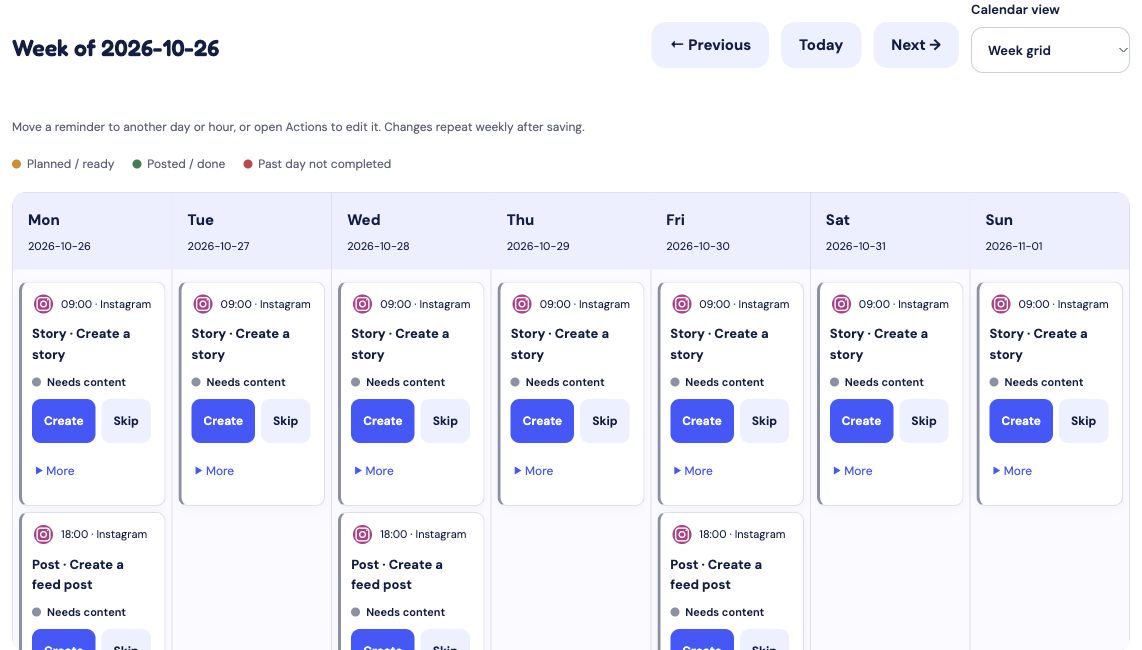
Two connected views of your social media routine: reminders for what to create, and a posting calendar for the content you plan to share.
See your weekly posting routine at a glance, with reminders for Stories, feed posts and Reels. Create content from a reminder and keep track of what still needs your attention.
LESS TOOL-HOPPING. MORE FOLLOW-THROUGH.
A connected social media workflow, with you in control at every step.
Brand direction & posting strategy
Start with your website, audience and goals. Build a brand direction and review AI-recommended posting times for the channels you choose.
AI social media content creation
Turn your ideas, photos and business updates into draft captions and branded creatives. Review the wording and make every post your own.
Creative studio & media library
Upload finished content or build it in SMR. Keep photos, videos and saved creatives together, with editing tools when you need them.
Social media calendar & reminders
Review your content, organise your schedule and see what needs attention. Publish through supported connections or follow a reminder to post yourself.
ONE BRAND. DIFFERENT CONVERSATIONS.
Plan social media content for Instagram, Facebook, TikTok, LinkedIn and X without treating every audience the same.
Make room for product stories, behind-the-scenes moments and useful tips.
Keep your business page active with content your customers can use.
Plan video ideas, prepare your creative and organise your posting routine.
Turn your experience and business news into thoughtful, relevant posts.
Plan concise updates and stay consistent between bigger announcements.
Planning support is distinct from direct publishing. Available connections and formats are shown in your workspace. SMR is not affiliated with or endorsed by these platforms.
BUILT FOR PEOPLE WITH A BUSINESS TO RUN.
For independent businesses, solo founders and creators who want a consistent presence without starting from scratch every time.
Explore SMR for small business ↗Keep your voice. Choose your pace. Build a routine you can actually stick to.
Meet the person behind SMR →A FEW GOOD QUESTIONS.
Want to weigh up your options? Explore our social media tool comparisons.
Social Media Reminder (SMR) is a social media planning and content tool for small businesses and creators. It brings brand direction, AI-assisted content creation, a content bank, a weekly calendar and posting reminders into one workflow.
SMR supports scheduling and publishing through available channel connections. Availability depends on the platform, account type, permissions and content format. Check the connection and publishing options in your workspace; where direct publishing is unavailable, prepare your content and post manually.
Yes. You can upload your own photos and videos, including finished creatives, and use them in your content workflow. You do not have to use AI generation or the creative editor for every post.
SMR can recommend posting times using your brand information, selected channels, audience and time zone. Treat these as a starting point to review and refine using your own results, rather than a guarantee of reach or growth.
WhatsApp delivery is not currently active. Use the reminder and delivery options available in your SMR workspace.
The pricing page lists current plans, trial terms, AI allowances and storage limits. Check those details before choosing a plan.
MAKE SOME ROOM FOR YOUR NEXT BIG IDEA.
AI helps you get started. Your judgement makes it yours.